About
XML Edition
- Content Assist
- Quick Assist
- Validation
- XPath Viewer
- Keyboard Shortcuts
- Source Actions
- More Stuff...
Java Integration
Get Rinzo
Get Involved
References


The editor's contextual has a couple of actions specific to xml manipulation
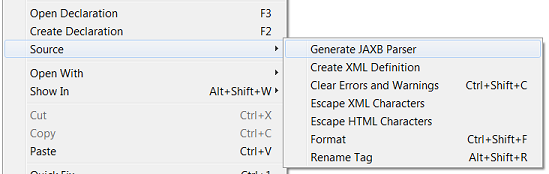
When the selected text corresponds to an existent class full qualified name, the action Open Declaration will be enable, which opens the source of the selected full qualified class name.
When the selected text corresponds to a non existent class full qualified name, the action Create Declaration will be enable, making possible the creation of a class with the selected full qualified class name.
See this JAXB Integration
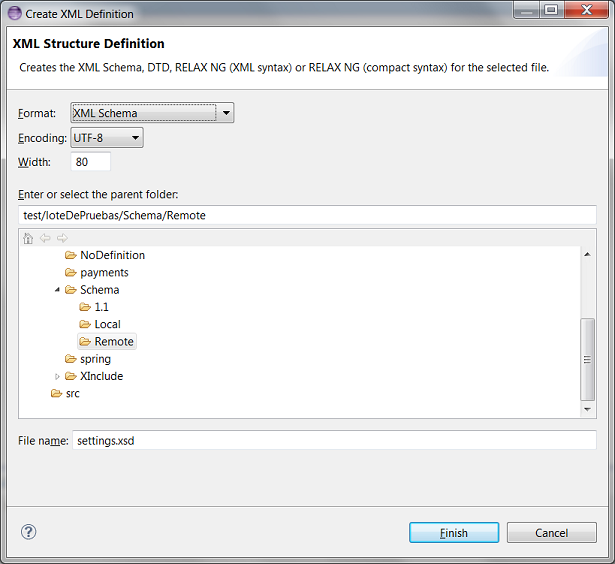
This option is present on the editor and xml files contextual menus and allows to generate an xml definition (xsd, dtd, relax ng) using the selected elements as examples inputs. Using the following dialog it could be configured:
As its name says this action will clean all errors and warnings on a opened document or selected files in the resources tree.
This action simply replaces all special characters in tag's attributes and bodies to the escaped version of them.
| Unescaped | Escaped |
|---|---|
| á | & #225; |
| eleiçóes | elei& #231;& #243;es |
This action simply replaces all special characters in tag's attributes and bodies to the escaped version of them.
| Unescaped | Escaped |
|---|---|
| á | ´ |
| eleiçóes | eleições |
Allows to rename:
This plugin handles automatically the cache of DTD and XSD used to validate files, but in case of a problem whith cached elements, this cache can be cleared by going to Window-Preferences-Rinzo XML and pressing "Clear Cache" button After a cleaning this cache will be refilled by the new elements needed to validate the files opened from that moment.